
• Home
  • Services
    • Room Rentals
    • Certified Instructors
  • Courses
    • SQL Server 2012 >
      • Administering Microsoft SQL Server 2012 Databases
      • MS10775
    • SharePoint 2010 >
      • Microsoft SharePoint 2010 for Developers
      • SharePoint Server 2010: Introduction
      • SharePoint Server 2010: L1
      • SharePoint Server 2010: L2
    • SharePoint 2010 Designer >
      • SharePoint Server 2010: Designer Level 1
      • SharePoint Server 2010: Designer Level 2
    • Microsoft InfoPath 2010
    • Developing ASP.NET MVC 4 Web Applications
  • Student Resources
    • Recommended Reading
    • Student Course Files
    • Certification Camps
    • First Day Feedback
    • Microsoft Companion Site
    • Student Evaluation
    • ProTech - Virtual Classes
    • ProTech - Boeing
    • Class Timer
    • Exam Tips
    • OCC ReConnect >
      • OCC ReConnect Feedback
      • OCC Exam Prep Materials
    • Dave Ramsey Financial Peace
    • Azure Free Trial
    • Microsoft Download Center
  • Event Calendar
  • Contact Us
    • Needs Analysis Survey
    • Clients
  • Other
    • Blog
    • Travel Photos
Certified Training Services
Call us at (248) 909-6304

Company Blog

Our company blog is used to inform our customers and readers of interesting news snippets, events and insights surrounding the tools, technologies and companies were are involved with in the training industry.

Google Maps Update 7.0...Fail!

7/26/2013

0 Comments

 
Picture
If you haven't noticed yet, Google has gutted it's Google Maps application for the Android with it's 7.0* update.  Google has removed many important and well like features like Layers and Search.  Some have labeled it "...the worst android update ever" and it is currently getting and overflow of 1 star ratings on Google Play. 

Here are a few of the features removed
  • Street view preview: Gone.
  • Route and alternates: Gone. You have to go back to the directions page in Maps to select a new route (easy enough - just tap the "x"), and those routes' times and traffic details aren't updated based on your present position, as far as we can tell. Hopefully that gets fixed.
  • Layers menu: Gone. Replaced by satellite view toggle, and traffic is displayed by default (gas stations, ATMs, restaurants etc. are all gone).
  • Other options: Screen dimming is gone (presumably this is now automatic), shortcuts to search, set destination, and help are gone as well.
  • On-screen zoom in / out buttons: Gone.
  • Search:  While driving, search would allow you to find something while en-route.  Gone.  Critical for this writer.
Here is a great article highlighting whats new and what has been removed.  Many of the new features are cool, but I think I will wait until a newer version comes back with these features added back in.

The links below will help you restore your application back to the previous version 6.14.4, the latest update before 7.01. Make sure for follow the instructions here to Turn Off Auto Updates. so you don't get it back until you want it.

Download Google Maps Version 6.14.4


Google Maps Version History
0 Comments

Windows 8.1 Preview... finally

7/10/2013

0 Comments

 
Picture
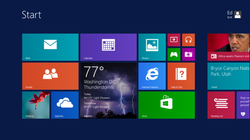
Windows 8.1 - a free update to Windows 8 - is coming later this year, and a  prerelease version is available now  for you to try. Windows 8.1 has new  ways for you to personalize your PC and includes a wave of awesome new apps and  services.  In a nutshell, the Start Menu is back.

Here are a few of the other features you will see;
  • A Start hint that appears on the taskbar, where the Windows 7 Start button is located
  • More flexible Start screen customization options
  • The option to go directly to the desktop instead of the Start screen
  • Much tighter integration with SkyDrive
  • More options for arranging modern (Metro) apps side by side
  • New “first party” (Microsoft-authored) Windows 8.1 apps
  • A redesigned Windows Store
  • New capabilities for third-party Windows 8.1 apps
  • A greatly enhanced PC Settings module that duplicates the desktop Control Panel
  • Support for smaller tablets
  • Internet Explorer 11, with significant improvements in tab handling and security
  • Some new capabilities for the on-screen keyboard on touch devices
  • Integrated search
Before you run out and install it, BEWARE!  Note the following questions that have been asked.

Question:  Can the Windows 8.1 Preview be uninstalled?
No. The only way to roll back to your previous installation is to wipe out the installation and replace it with a backup created before you installed the preview.
 
Question:  Will there be a direct upgrade path from the Windows 8.1 Preview to the final release of Windows 8.1?
Probably not. The  company’s official documentation does not cover this topic, so your best bet is to assume that a complete reinstall will be necessary.


0 Comments

    Author

    Jason Umphrey is the owner and CEO of Certified Training Solutions.  Jason has been a Microsoft Certified Trainer for more than 15 years and has work on numerous development projects for Fortune 500 companies

    Archives

    October 2015
    July 2013
    May 2013
    April 2013

    Categories

    All
    Book Recommendations
    C#
    Developer Tools
    Jquery
    Sql Server 2012
    Visual Studio

    RSS Feed

Contact Us

Event Calendar
Existing Clients
Needs Analysis

Our Services

Room Rentals

Galleries

Bellevue, WA

Student Resources

Recommended Reading
Student Course Files
First Day Feedback
Microsoft Companion Site
Metrics That Matter

ProTech Virtual Classes
OCC Reconnect
Dave Ramsey's Financial Peace
@ Copyright Certified Training Services, LLC | Davisburg, MI 48350 | (248) 909-6304 | [email protected]
Photo used under Creative Commons from mrhayata